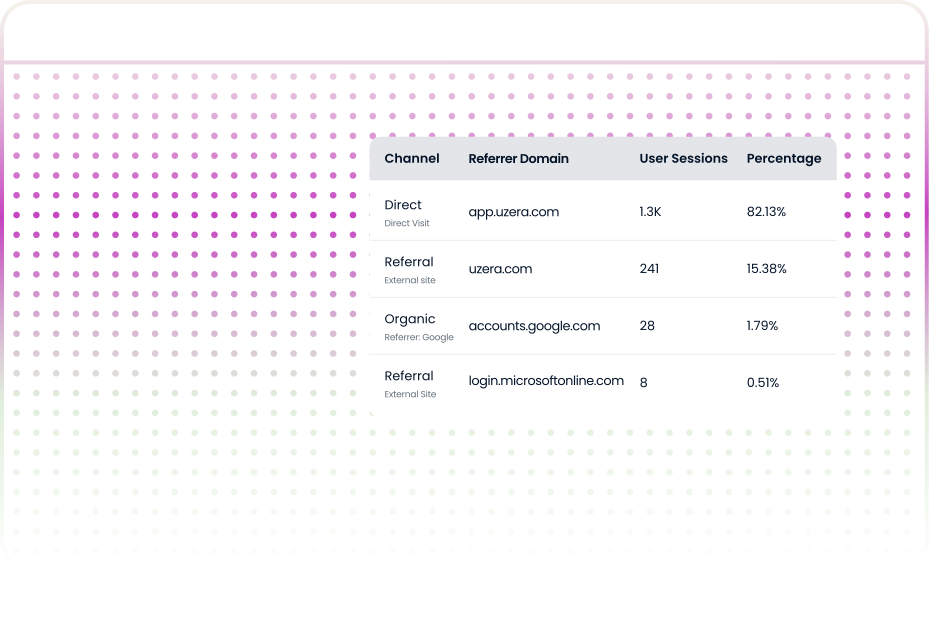
See Where Your Users Actually Come From

Your dashboard says 50,000 monthly sessions. That number tells you almost nothing about what is actually driving growth. Which channels send users who convert? Which referral domains produce sessions that bounce within eight seconds?

You cannot grow what you cannot measure. Product analytics tells you what users do inside your product. Traffic analytics tells you where they came from, how they got here, and whether the channels sending them are worth the investment.

START YOUR FREE TRIAL

What Is Traffic Analytics?

Traffic analytics is the practice of collecting, organizing, and interpreting data about who visits your website or product — where they come from, what devices and browsers they use, which geographic regions they represent, and how those patterns shift over time.

Channel Attribution

Know which acquisition channels — organic, paid, referral, social — are actually driving your growth.

Traffic Source Granularity

See specific domains and campaigns sending traffic, not just aggregate channel labels.

Device & Browser Breakdown

Understand how users access your product — desktop vs mobile, Chrome vs Safari.

Geographic Distribution

Discover which regions your users come from and where your next market opportunity lies.

Session Volume Trends

Track how traffic patterns change over time and correlate with your marketing efforts.

Active User Analytics

Distinguish between new and returning visitors to measure acquisition vs retention.

The Core Principle

vanity metrics tell you how many people showed up. Traffic analytics tells you where they came from, which channels produce users who actually convert, and which sources are generating noise that masquerades as growth.

Who Needs Traffic Analytics?

Traffic analytics is not niche. If your product has a website, runs campaigns, or acquires users from more than one channel — and every SaaS product does — you need it.

Marketing Managers

Separate real growth from vanity metrics.

When 23 features ship over 18 months but nine are used by fewer than 4% of active users, product analytics reveals the Feature Graveyard.

Turn session counts into channel performance reality

Growth Teams

Identify which channels drive activated users, not just visits.

Instead of guessing why trial signups are flat, look at the data: Google Ads generated 2x the sessions but LinkedIn referral traffic had a 4x higher trial signup rate. The budget was not wrong — the allocation was.

Know which channels produce users who actually convert

Founders & CPOs

Spot unexpected markets.

When geographic data shows that 12% of active users are in Brazil — a market nobody targeted — the case for a localization experiment writes itself. One team ran a Portuguese landing page; trial signups from LATAM increased 40% within one quarter.

Discover unexpected market opportunities in your data

CRO Specialists

Understand conversion problems by device and browser.

Traffic analytics reveals that mobile sessions grew from 18% to 34% over six months while mobile signup conversion remained less than half the desktop rate. That gap between traffic reality and conversion performance is invisible without device-level measurement.

Optimize where your traffic actually is, not where you think it is

Engineering Leaders

Focus performance work where users actually are.

When browser analytics shows that 70% of traffic uses Chrome and 15% uses Edge, spending equal QA time on Safari rendering bugs is a misallocation. Traffic data tells you where your users actually are — and where your testing effort should follow.

Allocate engineering resources based on real usage patterns

Customer Success

Understand your user base beyond feature usage.

If an enterprise customer's users are predominantly in a region with 200+ milliseconds of server latency, that infrastructure issue shows up in traffic analytics as a pattern — one that affects activation and retention before it shows up in a support ticket.

Spot infrastructure issues before they become complaints

How Traffic Analytics Actually Works

Understanding the mechanics helps you set realistic expectations, evaluate tools more critically, and troubleshoot issues when your data looks wrong — which, at some point, it will.

Step 1

Tracking Script Installation

A lightweight JavaScript snippet is embedded on your website or product. This script executes on every page load and captures session-level data: referrer URL, UTM parameters, page path, device type, browser, screen resolution, and geographic information derived from the user's IP address.

Modern tracking scripts are designed to be non-blocking — they load asynchronously and typically add less than 50 milliseconds to page load time.

Step 2

Session Identification and Grouping

The script assigns a session identifier to each visit, grouping all page interactions within a single browsing window into one session. Sessions typically expire after 30 minutes of inactivity, consistent with the industry standard.

Active users are identified by persistent identifiers so that the same person visiting on Monday and Thursday counts as one active user, not two.

Step 3

Source Classification

The system classifies each session into a channel based on a hierarchy of signals. If the session has UTM parameters, those take precedence. If there is a referrer URL from a known domain, it is classified as referral or organic depending on whether the referrer is a search engine.

This classification logic is where most attribution errors originate — sessions that should be tagged as organic or referral end up as "direct" because the referrer header was stripped.

Step 4

Aggregation and Visualization

Raw session data is aggregated into dashboards showing totals, trends, distributions, and breakdowns by channel, device, browser, and geography. Most platforms compute these in near-real-time, with full accuracy available within minutes.

Good traffic analytics tools let you filter by date range, device, channel, geography, and specific referrer domains.

Step 5

Privacy and Compliance

Traffic analytics captures behavioral data, which means privacy regulations apply. IP addresses should be anonymized or hashed. Cookie consent mechanisms should be in place for users in jurisdictions that require them .

Your analytics provider should be transparent about data storage locations, retention periods, and processing practices.

What You See in a Uzera Traffic Analytics Dashboard

Not every traffic analytics tool gives you the same level of detail. Here is what Uzera surfaces on every dashboard — and why each element matters.

Channel Distribution with Real-Time Breakdown

Real-time breakdown across direct, organic search, referral, paid, social, and email. See which channels dominate your traffic mix.

Traffic Source Breakdown Table

See which specific domains send traffic, how many sessions each generates, and conversion rates by source.

Device and Browser Analytics

Daily distribution of desktop, mobile, and tablet sessions over time. Browser split across Chrome, Edge, Safari.

Geographic Distribution

Country-level breakdown with percentage share and absolute user counts. Reveals unexpected market opportunities.

Session Volume and Active User Trends

Total sessions and active user counts with percentage changes from prior periods tracked over time.

User Growth Trends

Distinguish between acquisition momentum and re-engagement patterns to identify leaky buckets.

Five Patterns Every Growth Team Should Recognize

After running growth programs across multiple B2B SaaS products, most acquisition problems fall into recognizable patterns. Knowing these saves you time because you move from raw data to hypothesis faster.

The Attribution Black Hole
When to use:

Session counts climb month over month. The team celebrates growth. But trial signups, activation rates, and revenue remain flat.

What to watch for:

You are acquiring traffic that does not convert. A SaaS product celebrating 50,000 monthly sessions discovered that 38% were internal team usage, 22% were from a content syndication partner whose visitors bounced within 8 seconds, and only 14% came from channels that produced a trial signup.

First thing to check:

Audit your UTM conventions across all campaigns. If even 30% of your email and social links are missing UTM parameters, those sessions are being misclassified as direct — making your actual performing channels look weaker than they are.

The Vanity Metric Trap
When to use:

Session counts climb month over month. The team celebrates growth. But trial signups, activation rates, and revenue remain flat.

What to watch for:

You are acquiring traffic that does not convert. A SaaS product celebrating 50,000 monthly sessions discovered that 38% were internal team usage, 22% were from a content syndication partner whose visitors bounced within 8 seconds, and only 14% came from channels that produced a trial signup.

First thing to check:

Audit your UTM conventions across all campaigns. If even 30% of your email and social links are missing UTM parameters, those sessions are being misclassified as direct — making your actual performing channels look weaker than they are.

The Mobile Blind Spot
When to use:

Session counts climb month over month. The team celebrates growth. But trial signups, activation rates, and revenue remain flat.

What to watch for:

You are acquiring traffic that does not convert. A SaaS product celebrating 50,000 monthly sessions discovered that 38% were internal team usage, 22% were from a content syndication partner whose visitors bounced within 8 seconds, and only 14% came from channels that produced a trial signup.

First thing to check:

Audit your UTM conventions across all campaigns. If even 30% of your email and social links are missing UTM parameters, those sessions are being misclassified as direct — making your actual performing channels look weaker than they are.

The Hidden Geographic Opportunity
When to use:

Session counts climb month over month. The team celebrates growth. But trial signups, activation rates, and revenue remain flat.

What to watch for:

You are acquiring traffic that does not convert. A SaaS product celebrating 50,000 monthly sessions discovered that 38% were internal team usage, 22% were from a content syndication partner whose visitors bounced within 8 seconds, and only 14% came from channels that produced a trial signup.

First thing to check:

Audit your UTM conventions across all campaigns. If even 30% of your email and social links are missing UTM parameters, those sessions are being misclassified as direct — making your actual performing channels look weaker than they are.

The Accidental Referral Engine
When to use:

Session counts climb month over month. The team celebrates growth. But trial signups, activation rates, and revenue remain flat.

What to watch for:

You are acquiring traffic that does not convert. A SaaS product celebrating 50,000 monthly sessions discovered that 38% were internal team usage, 22% were from a content syndication partner whose visitors bounced within 8 seconds, and only 14% came from channels that produced a trial signup.

First thing to check:

Audit your UTM conventions across all campaigns. If even 30% of your email and social links are missing UTM parameters, those sessions are being misclassified as direct — making your actual performing channels look weaker than they are.

Real Decisions Driven by Traffic Analytics Data

Traffic analytics is only valuable if it changes what you do next. Here are situations where traffic analytics data directly informed a growth decision.

Reallocating Ad Budget Without Increasing Spend

The Challenge

A startup was splitting its paid advertising budget equally between Google Ads and LinkedIn Ads. Despite increasing traffic, trial signups were not improving as expected.

The Discovery

Traffic analytics revealed that Google Ads generated twice the sessions, but LinkedIn referral traffic produced a 4× higher trial signup rate.

The Solution & Result

The team shifted 60% of their budget to LinkedIn and limited Google Ads to branded search campaigns.

Result: +35% increase in trial signups without increasing total ad spend.

Discovering an Untapped Market Nobody Targeted

The Challenge

A product analytics company focused its marketing on US-based teams and had no campaigns targeting other regions.

The Discovery

Traffic analytics showed that 12% of active users were coming from Brazil, even though the company had never targeted that market.

The Solution & Result

The team launched a localization experiment with a Portuguese landing page and a region-specific case study.

Result: +40% increase in trial signups from LATAM within one quarter.

Making the Business Case for Mobile

The Challenge

The team believed their B2B audience primarily used desktop devices, so mobile experience improvements were repeatedly deprioritized.

The Discovery

Device analytics revealed that mobile sessions had grown from 18% to 34% over six months, while mobile signup conversion was less than half of desktop.

The Solution & Result

The team prioritized a mobile-first redesign of the signup flow.

Result: The redesign addressed a major conversion gap and aligned the experience with actual user behavior.

Turning an Accidental Traffic Source into a Growth Channel

The Challenge

The team was investing heavily in paid acquisition but struggled to find consistently high-performing channels.

The Discovery

Traffic source analytics revealed that a niche industry blog was sending 200+ sessions per month, with visitors converting at 3× the average rate.

The Solution & Result

The team partnered with the blog’s editor on a co-marketing collaboration, turning the referral into a structured acquisition channel.

Result: The partnership became their second-largest acquisition source, outperforming two paid campaigns combined.

Common Mistakes That Make Your Traffic Analytics Useless

These are patterns that undermine traffic analytics programs at otherwise smart teams. Every one of them leads to false confidence or wasted budget.

Treating "direct traffic" as a single, clean category

The Problem

In most analytics tools, direct traffic doesn’t just mean users typing your URL. It’s often a catch-all bucket for sessions where the source was lost, including:

  • Email links without UTMs
  • Mobile app links
  • HTTPS → HTTP transitions
  • Bookmarked pages

When direct traffic dominates your reports, your attribution is likely broken.

The Solution

Audit every campaign link and enforce consistent UTM tagging.
 Also verify your redirect chains preserve referrer data so traffic sources are tracked correctly.

Checking traffic data only when something feels wrong

The Problem

Many teams only check analytics after they notice a traffic drop or campaign issue.

By then, the campaign may have already been running for weeks without detection.

The Solution

Create a weekly analytics review habit.

A simple 30-minute weekly review helps you monitor:

  • Channel mix changes
  • Traffic spikes or drops
  • New referral sources
  • Device distribution trends

Regular reviews catch issues before they become expensive problems.

Ignoring browser and device data entirely

The Problem

Teams often optimize their experience for desktop because they assume most users are on laptops.

But traffic trends frequently show mobile usage growing quickly.

Many teams only discover this months later.

The Solution

Segment every key metric by device and browser.

Track :

  • Desktop vs mobile traffic share
  • Conversion rates by device
  • Browser compatibility issues

If mobile traffic is rising but conversions aren’t, your mobile experience needs improvement.

Comparing raw session counts across channels without normalizing for quality

The Problem

Teams often optimize their experience for desktop because they assume most users are on laptops.

But traffic trends frequently show mobile usage growing quickly.

Many teams only discover this months later.

The Solution

Evaluate channels using traffic quality, not just traffic quantity. Always pair session volume with metrics like:

  • Trial signups
  • Conversions
  • Activation rates

Focus investment on channels that send users who actually convert.

Over-indexing on geographic data without context

The Problem

A spike in traffic from a new country may look like a promising growth opportunity.

But sometimes the spike is caused by bot traffic or crawlers.

Acting too quickly can lead to wasted localization or marketing investment.

The Solution

Validate geographic spikes before making decisions.

Cross-check:

  • Device distribution
  • Browser types
  • Session duration
  • Conversion behavior

If the traffic behaves like real users, it may reveal a genuine new market opportunity.

Setting up analytics once and never revisiting the configuration

The Problem

Many teams configure analytics during product launch and never revisit the setup.

Over time:

  • UTMs break
  • Campaign naming becomes inconsistent
  • Referral sources change
  • Tracking scripts stop firing correctly

Eventually the data becomes unreliable.

The Solution

Treat analytics as an ongoing system, not a one-time setup.

Regularly:

  • Audit tracking scripts
  • Clean up UTM conventions
  • Review source attribution
  • Update channel definitions

Maintaining your analytics ensures the data stays accurate and decision-ready.

A Practical Roadmap for Getting Started

You do not need a data engineering team to get traffic analytics running. Here is a phased approach that minimizes setup effort and maximizes early insight.

Audit What You Already Have

  • Before adding new tools, review what already exists.

    • Which analytics tools are installed?
    • Are tracking scripts firing on every page?
    • Are UTM parameters used consistently?


    Most teams discover a gap — like tracking on the marketing site but not inside the product. Fix that first.

Define Your Channel Taxonomy

  • Decide how you classify traffic before data starts flowing.

    • Direct
    • Organic Search
    • Paid Search
    • Social
    • Referral
    • Email
    • Partner


    Clear channel definitions prevent traffic from ending up in a vague “Other” category later.

Install Tracking on Your Highest-Value Pages

  • Start with pages that drive conversions:

    • Pricing page
    • Signup page
    • Demo request page
    • Key landing pages


    Install the tracking script and verify it works across devices and browsers.

    With Uzera, setup takes less than an hour.

Establish a Two-Week Baseline

  • Let data collect for two weeks before making changes.

    This helps you understand:

    • Normal traffic patterns
    • Device distribution
    • Channel performance trends


    Focus on observing patterns, not optimizing yet.

Build a Weekly Review Habit

  • Create a simple 30-minute weekly review.

    Look for:

    • Changes in channel mix
    • Traffic spikes or drops
    • Device trends
    • New referral sources


    Consistent review is what turns traffic data into real insights.

Frequently Asked Questions

Can’t find the answer you're looking for?
Email us any time: help@uzera.com

What is traffic analytics?

Traffic analytics is the process of collecting and analyzing data about website visitors — including where they come from (acquisition channels), what devices and browsers they use, their geographic location, and how their visit patterns change over time. It helps teams understand which marketing efforts are working and where to invest next.

How is traffic analytics different from product analytics?

Traffic analytics is the process of collecting and analyzing data about website visitors — including where they come from (acquisition channels), what devices and browsers they use, their geographic location, and how their visit patterns change over time. It helps teams understand which marketing efforts are working and where to invest next.

What is a good number of active traffic sources for a SaaS product?

Traffic analytics is the process of collecting and analyzing data about website visitors — including where they come from (acquisition channels), what devices and browsers they use, their geographic location, and how their visit patterns change over time. It helps teams understand which marketing efforts are working and where to invest next.

How often should I review traffic analytics?

Traffic analytics is the process of collecting and analyzing data about website visitors — including where they come from (acquisition channels), what devices and browsers they use, their geographic location, and how their visit patterns change over time. It helps teams understand which marketing efforts are working and where to invest next.

Can traffic analytics help with SEO?

Traffic analytics is the process of collecting and analyzing data about website visitors — including where they come from (acquisition channels), what devices and browsers they use, their geographic location, and how their visit patterns change over time. It helps teams understand which marketing efforts are working and where to invest next.

Does traffic analytics slow down my website?

Traffic analytics is the process of collecting and analyzing data about website visitors — including where they come from (acquisition channels), what devices and browsers they use, their geographic location, and how their visit patterns change over time. It helps teams understand which marketing efforts are working and where to invest next.

Does Uzera's product analytics require engineering resources to set up?

Traffic analytics is the process of collecting and analyzing data about website visitors — including where they come from (acquisition channels), what devices and browsers they use, their geographic location, and how their visit patterns change over time. It helps teams understand which marketing efforts are working and where to invest next.

What makes Uzera different from other traffic analytics tools?

Traffic analytics is the process of collecting and analyzing data about website visitors — including where they come from (acquisition channels), what devices and browsers they use, their geographic location, and how their visit patterns change over time. It helps teams understand which marketing efforts are working and where to invest next.