.png)
Your dashboard says 1200 monthly active users.
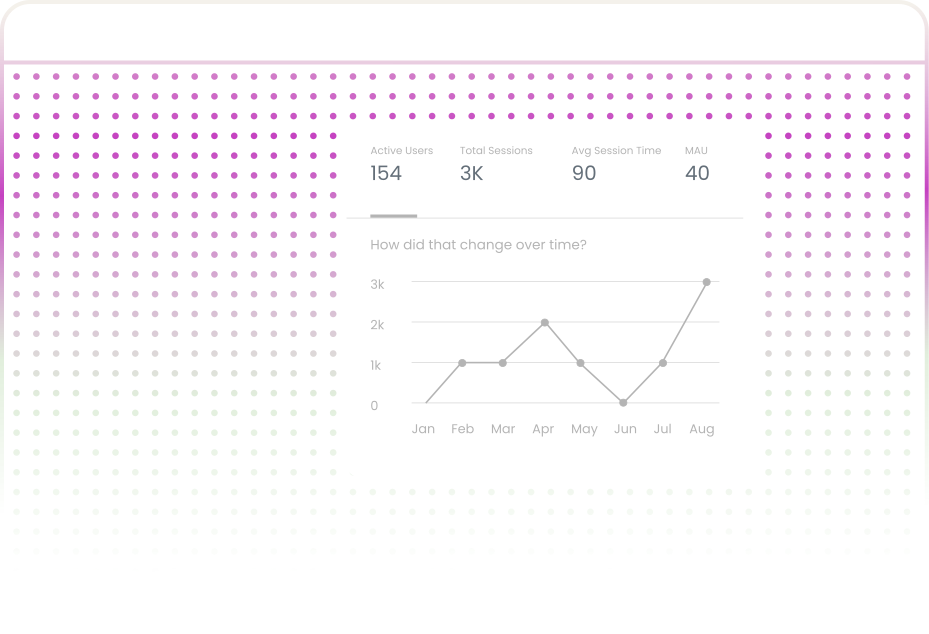
That number tells you almost nothing about what is actually happening. Track sessions, active users, bounce rates, and page-level performanceall in one dashboard.
Product Analytics is not niche. If your product has users who log in and interact with features - and every SaaS product does - you need it.
.svg)
Track total sessions and trends over time.

Monitor unique users and MAU growth.
.svg)
Monitor unique users and MAU growth.

Understand user exploration patterns.

Identify friction points page by page.
.svg)
Export detailed performance data instantly.
Product analytics is not niche. If your product has users who log in and interact with features as every SaaS product does you need it.

Product analytics reveals the Feature Graveyard when 23 features ship over 18 months, but fewer than 4% of active users use nine of them.
Feature prioritization based on actual usage data

Churned users had an average session duration of 47 seconds versus 4+ minutes for retained users — that's a fundamentally different problem.
Identify activation gaps before they become churn

When 52% of new users bounce at the workspace setup screen, the case for fixing onboarding before building the next feature writes itself.
Let user data drive your roadmap. Build what matters most.

A layout might look clean in Figma, but product analytics reveals that users bounce from that page at three times the expected rate.
Close the gap between design intent and user behavior.
A slow loading page shows a 40% bounce rate and 8-second average session; the case for optimization has data behind it.
Justify technical debt payoff with evidence.
.svg)
If a customer's users show declining session duration and rising bounce rates, that's an early warning signal.
Proactive intervention based on engagement signals.
Understanding the mechanics helps you set realistic expectations, evaluate tools more critically, and avoid blaming the tool for problems that are actually configuration issues.
A lightweight script embedded in your product captures user interactions. It records page views, clicks, form submissions, and navigation events.
The industry standard defines a session as a continuous sequence of interactions. A user who checks your dashboard at 9 AM, leaves, and returns at 11 AM generates two sessions, not one.
The system maps sessions to individual users. For authenticated products, the user ID links sessions across devices and time.
.svg)
Raw event data is aggregated into metrics on your dashboard. These include session counts, durations, bounce rates, page-level breakdowns, and user trend lines.
.svg)
This is where product analytics gets specific. Page-level reports break down total visitors, unique visitors, and bounce rate for each page in your product.
Not every product analytics tool gives you the same level of detail. Here is what Uzera surfaces on every dashboard — and why each element matters.
Uzera provides insights into total sessions and their trends, allowing you to quickly assess engagement levels and identify any changes following a release or campaign.
Active users measure how many unique people interact with your product in a given period, helping you track real product adoption over time.
.svg)
Track the time users spend within your product. This metric reveals engagement quality and whether users are efficiently finding value or facing challenges.
Uzera monitors bounce rate trends, helping you identify sudden increases due to UX problems, slow loading times, or recent updates.
.svg)
Higher exploration often indicates discovery, while focused navigation shows experienced users moving efficiently through workflows.
.svg)
Uzera generates detailed page reports, showing visitor counts and bounce rates to identify friction points and improvement areas.
Product analytics provides your team with real user behavior data, eliminating guesswork and ensuring that every product decision you make is based on evidence rather than assumptions.

A SaaS team built an AI-powered summary feature for their reporting tool. It took six weeks of engineering time and looked promising during development.
Product analytics revealed weak engagement:
Users weren’t finding value in the feature.
The team deprecated the feature and simplified the interface.
After removing it, sessions per user increased because the product became easier to navigate and had less cognitive overhead.

A productivity SaaS product had strong signup numbers but poor day-7 retention. Many users abandoned the product before experiencing its core value.
Traffic analytics showed that 12% of active users were com. Product analytics identified the problem: the workspace setup screen, where 52% of new users bounced.
The onboarding flow required five configuration steps before users could see any results. ing from Brazil, even though the company had never targeted that market.
The team redesigned onboarding to show a pre-populated demo workspace on first login and moved configuration to a later step.
Day-7 retention improved by 28% within six weeks.

A B2B analytics tool believed most users accessed the product via desktop devices.
As a result, mobile usability had never been prioritized.
Product analytics showed that 22% of sessions were coming from mobile, and those sessions had bounce rates nearly double desktop.
Mobile users were struggling with the product experience.
The data gave engineering leadership clear evidence to prioritize responsive design improvements.
The decision ended a debate that had stalled for two quarters and aligned the team around improving the mobile experience.

The team was investing heavily in paid acquisition but struggled to find consistently high-performing project management tools, which saw 19% month-over-month growth in new users.
There were no new marketing campaigns, launches, or press coverage to explain the increase. performing channels.
Product analytics showed that most new users were landing on shared project pages, not the homepage.
Existing users were sending project links to collaborators.
Those collaborators began signing up to interact with the shared projects.
The product’s sharing mechanics unintentionally became a powerful acquisition channel, outperforming paid campaigns.
You already have product analytics data. You just have not started collecting it yet. Every session, every bounce, and every page visit are signals. Users are voting with their behavior, showing you what works, what confuses them, and what they ignore entirely.


Product analytics is the measurement of how users interact with a software product — tracking sessions, active users, engagement depth, bounce rates, and page-level performance over time. It helps product teams understand which features are adopted, where users disengage, and how usage patterns change in response to product decisions.
Product analytics tracks how users behave inside your product, while traditional analytics only measures broad business metrics like sales and revenue.
Web analytics tracks who visits your website, while product analytics tracks what users actually do inside your product after they log in.
A bounce rate below 30% is excellent, 30–50% is healthy, and anything above 70% signals a poor onboarding or user experience issue.
With Uzera, you simply install a lightweight script and start capturing user behavior automatically from day one — no developer needed.
No product analytics won’t directly tell you exactly which feature to build next.But it gives you deep insights into user behavior—what they ignore, where they drop off, and what drives churn so you can confidently decide what to build for the highest impact.

.svg)


.svg)

