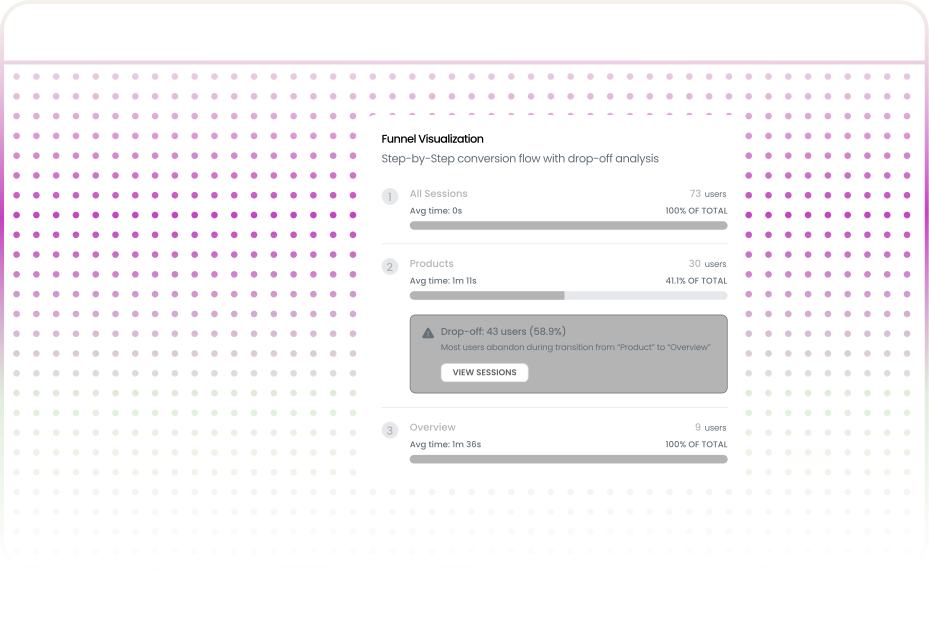

Your dashboard says 18% of signups reach activation. That single number hides everything you actually need to know. Aggregate numbers tell you that users leave. Funnel analysis tells you where, when, and who.
Funnel analysis maps a specific sequence of steps inside your product. Examples include the transition from signup to activation, from free trial to paid, and from feature discovery to adoption.

Define the critical paths through your product and track each step.

See exactly where and how many users abandon each step.

Know which specific users dropped off and their characteristics.
.svg)
Understand if users are confused (long time) or bouncing (short time).

See not just how many users visit but where they struggle and why they leave Funnel analysis highlights the points that need attention to improve retention.
Funnel analysis is not niche. If your product has a multi-step user journey and every SaaS product does you need it.

When 40% of trial users never complete setup the funnel shows whether they stop at the configuration screen the integration step or the first meaningful action

Prioritize experiments by focusing on the step with the largest drop-off where a small improvement in conversion produces the biggest absolute impact on downstream revenue.

Make build-versus-fix decisions. When the biggest leak in your product is at Step 3 of a five-step flow, that data changes the roadmap conversation. It's difficult to argue for a new feature when half your users never experience the features you already built.

Ground design decisions in evidence rather than intuition. A layout might look clean in Figma, but funnel data reveals that users abandon the step at three times the expected rate.
Quantify the impact of technical debt. When a slow-loading step shows a 35% drop-off and the average time-on-step is 18 seconds, far higher than the 3-second benchmark the case for performance optimization writes itself.
.svg)
Identify at-risk accounts before they churn. If an enterprise customer's users are consistently dropping off at Step 4, that's an early warning signal, one that shows up in funnel data weeks before it shows up in a renewal conversation.
Understanding the mechanics helps you set realistic expectations and evaluate tools more critically.

.svg)
Map the key steps that define how users engage with your product.
Example: Signup → Create project → Add task → Invite teammate

Every step must be a clear action or page:
Ambiguous steps create bad data.
.svg)
Decide how long users have to complete the funnel.
Examples:

Let the funnel run for 1–2 weeks.
Your baseline reveals:
.svg)
Focus on one step at a time.
Improve it. Measure again. Repeat.
That is how funnels drive product improvement.
Not every traffic analytics tool gives you the same level of detail. Here is what Uzera surfaces on every dashboard and why each element matters.
.svg)
The report shows users per step and the percentage relative to Step 1When Step 3 is 61% and Step 4 is 29% you know 32 percentage points of users dropped off at that transition.
Step duration reveals where users get stuckQuick steps mean ease of useLong steps highlight friction points that need attention.
.svg)
Understand the impact of each drop-offLosing 33 free-tier trial users is very different from losing 12 enterprise evaluators.

Performance shifts after product changes marketing campaigns bug fixes or seasonal patternsAlways compare across periods before drawing conclusions.
After analyzing funnels across dozens of SaaS products, most problems fall into recognizable patterns. Knowing these patterns saves you time because you move from diagnosis to hypothesis faster.

.svg)
.svg)
.svg)
40%+ drop-off between Step 1 and Step 2
.svg)
Your entry point attracts users who are not ready, not qualified, or not finding what they expected. Often caused by marketing messages that don't match the product experience.
Compare the messaging that sends users into the funnel with what they encounter at Step 1. Misalignment there is the most frequent cause.

Users pass the first steps smoothly, but conversion flattens or drops sharply around Step 3 or Step 4. Early progression looks healthy, then the funnel hits a plateau.
Users understand your product's promise and are willing to start, but they hit friction mid-journey. Common causes include a step that demands too much effort (like configuring integrations), unclear next steps, or a point where perceived value hasn't matched the effort invested.
Audit your UTM conventions across all campaigns. If even 30% of your email and social links are missing UTM parameters, those sessions are being misclassified as direct — making your actual performing channels look weaker than they are.

No single step has a dramatic drop-off, but every step loses 15–25% of users. The funnel bleeds steadily from top to bottom, producing a much lower overall completion than any individual step suggests.
The entire experience has consistently low-grade friction. The flow is too long, each step asks slightly too much, or small moments of hesitation at every transition compound turn into a poor overall conversion rate.
Audit your UTM conventions across all campaigns. If even 30% of your email and social links are missing UTM parameters, those sessions are being misclassified as direct — making your actual performing channels look weaker than they are.

Users progress through the funnel with strong conversion at every step, then 40%+ drop off at the very last step—the point of commitment, like entering payment, inviting a teammate, or publishing.
Users see the value but hesitate at the moment of commitment. Often caused by unexpected costs appearing at the final step, a premature request for sensitive information like a credit card, or a lack of trust signals where the user is asked to make a real decision.
Audit your UTM conventions across all campaigns. If even 30% of your email and social links are missing UTM parameters, those sessions are being misclassified as direct — making your actual performing channels look weaker than they are.

Users drop off at a specific step, reappear days or weeks later, and re-enter the funnel from the beginning—sometimes multiple times—without ever completing it.
Users are interested but not yet convinced. They keep returning because the product appeals to them, but something blocks completion — a step requiring information they don't have handy, a pricing decision needing internal approval, or a lack of progress saving that forces them to restart.
Audit your UTM conventions across all campaigns. If even 30% of your email and social links are missing UTM parameters, those sessions are being misclassified as direct — making your actual performing channels look weaker than they are.
Funnel analysis is only valuable if it changes what you build. Here are situations where funnel data directly informed a product decision drawn from real work across different SaaS products.

A developer tools company had a five-step onboarding flow with an overall activation rate of 22%. The "configure API keys" step had a 48% drop-off.
The step was not technically difficult. The page was dense with technical documentation that made it look harder than it was. Perception, not complexity, was the barrier.
They replaced the wall of text with a single "Generate API Key" button and a three-line code snippet.
Result: Drop-off at that step fell from 48% to 14% in three weeks. Overall activation climbed to 37%.

A SaaS analytics product had a free-to-paid upgrade funnel with an overall conversion rate of 2.3%, assumed to be normal for self-serve.
The biggest drop-off was not at the payment step it was between "visit pricing page" and "select a plan." 71% of users who viewed the pricing page left without clicking any plan.
Simplifying from three tiers to two with a "recommended for you" banner.
Result: Pricing-to-selection conversion improved by 34%.

A project management tool showed 41% overall completion. When they segmented by device, mobile users—28% of all signups—had just 12% completion.
The workspace configuration screen used a multi-column drag-and-drop layout that was nearly unusable on touch screens. Elements overlapped, buttons were too small to tap.
Redesigned the configuration screen with a mobile-first approach.
Result: The team had been missing that more than a quarter of their users hit a wall. Segment your funnels by device. Always.

A CRM launched a "quick add" feature and needed to track adoption.
38% of active users entered the funnel organically, with no prompts or onboarding nudges. 91% of those completed the deal creation. The old flow had 73% completion.
The funnel proved organic adoption and reduced friction.
Result: Justified expansion of the pattern to contacts and tasks.
These are the patterns I've observed undermining funnel programs at otherwise capable teams. All of them result in false confidence or wasted effort.


Teams often build very long funnels assuming more steps mean more precision. In reality, a 10–12 step funnel introduces noise. Every additional step adds measurement variance, making it harder to identify where the real drop-off occurs.
.png)
Keep funnels between 3 and 7 steps.
If your user journey is longer, split it into two smaller funnels. Shorter funnels make it easier to isolate the step causing friction.
Looking at funnel performance as a single snapshot hides trends. A funnel showing 35% completion over 30 days might hide the fact that it dropped from 50% to 20% after a product change or bug.
Always compare funnel data across times.
Track weekly or monthly changes to understand whether performance is improving or declining.

Steps like “User engages with the product” are impossible to measure consistently. When funnel steps are vague, the data becomes unreliable and difficult to interpret.
Define every step as a clear action or page event.
Segment every key metric by device and browser.
Examples include:
If a step cannot be described in one clear sentence, it is too vague.

Not all traffic is equal.
1,000 sessions from organic search and 1,000 sessions from a syndication partner can produce very different results.
Teams that optimize for traffic volume often ignore conversion performance.
Look at the specific users who dropped off.
User-level data reveals patterns like:
This turns a generic metric into actionable insight.
Funnels become outdated as products evolve. Steps change, new features appear, and user behavior shifts. Old funnels often track flows that no longer exist.
Review and update funnel definitions every quarter.
Funnels should reflect how users currently experience the product, not how it worked months ago.
Not all drop-offs indicate friction. Some users simply realize the product is not right for them. Trying to “fix” every drop-off can lead to unnecessary changes.
Segment funnel data by user type or ICP.
A large drop-off among unqualified users is normal.
A large drop-off among your ideal customers is the signal that requires attention.
You do not need to map every user journey in your product on day one. Here is a phased approach that minimizes setup effort and maximizes early insight.
Start with the path that drives retention and activation.
For most SaaS products, that is:
Signup → Activation
Define 3–5 clear steps and begin collecting data.
Let the funnel run for about two weeks before making changes.
Focus on three key metrics:
These reveal where the real friction exists.
Prioritize the step where the most users leave.
Improve it by:
Focus on one improvement at a time.
After shipping the change, compare results with your baseline.
If the drop-off improves, move to the next problem.
If not, investigate what introduced new friction.
Once your main funnel is healthy, track additional journeys like:
Each funnel reveals new opportunities to improve the product.


Funnel analysis maps a sequence of steps in a user journey — signup to activation, free trial to paid, feature discovery to adoption — and measures how many users complete each step. It reveals exactly where users drop off and provides the data to diagnose and fix conversion bottlenecks.
Conversion rate tracking only tells you the final percentage of users who completed a goal, while Uzera's funnel analysis shows you every step in between—pinpointing exactly which stage is losing users and why.
A SaaS onboarding funnel completion rate of 60% or above is generally considered healthy, though Uzera's Funnel Analytics helps you continuously identify and remove friction at each step to push that number higher over time.
A funnel should have only as many steps as necessary to guide users to their first key outcome—Uzera recommends keeping onboarding funnels focused and lean, typically between 3 to 7 clearly defined steps.
Yes Uzera allows you to build and analyze funnels using previously captured user behavior data so you can uncover drop-off patterns and insights without having to wait for new data to accumulate.
Uzera recommends reviewing your funnel data at least weekly so your team can quickly spot new drop-off trends, test improvements, and continuously optimize the user journey before small friction points become big churn problems.
No Uzera's funnel tool is completely no-code, meaning your product, growth, or customer success team can build, launch, and analyze funnels instantly using Uzera's lightweight script with zero developer involvement required.
Users move through funnels with every action, even if you haven't drawn them; the data already shows where leaks occur.

.svg)


.svg)

