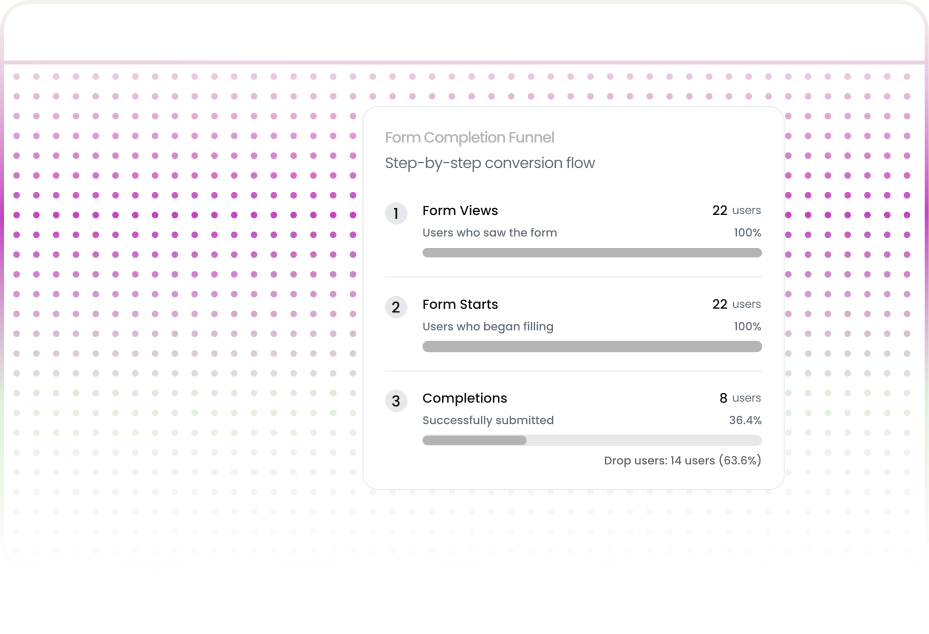

Your landing page does everything right. The headline grabs attention. The copy builds urgency. Visitors scroll to your form, start filling it out, and then leave.
It goes beyond tracking submissions and abandonment rates. Form analytics measures field-level metrics to reveal friction points that cause users to leave before converting.
A binary outcome shows completion or abandonment. It doesn’t explain why users drop off.
Not all form data carries equal weight. Here are the metrics that consistently lead to actionable improvements.

The percentage of users who abandon your form at a specific field. If 500 users start your form and 140 of them leave when they reach the "Annual Revenue" field, that's a 28% drop-off rate on a single field.
Key Insight: High drop-off rates on individual fields are gold mines for optimization. They point you to the exact moment a visitor decided your form wasn't worth completing.

Average completion time per field exposes hidden friction. A name field typically takes 3-5 seconds. An address field might take 8-12 seconds. But if your "Describe Your Use Case" text area averages 47 seconds and has a 31% abandonment rate, users are struggling.
Key Insight: Anomalies in completion time highlight UX issues that other metrics miss. A password field taking 22 seconds instead of 6 suggests unclear validation rules.

How often users delete and re-enter input in the same field. A high refill rate on a date picker means the format is ambiguous; on a password field, the validation rules aren't clear.
Key Insight: Every refill represents a moment of user frustration that could become a permanent exit. Fields with refill rates above 15% almost always have a design or communication problem.

The percentage of users submitting forms with empty fields. If an optional field is always left blank, consider removing it to reduce clutter.
Key Insight: If a required field has a high blank-submission attempt rate, your validation messaging might not be visible enough, or users genuinely don't have the information you're asking for.
Pinpoints where users stopped so you know exactly where to start fixing. Instead of guessing which part of your form is leaking conversions, you have a precise location to investigate, test, and improve."
When you pair this with session replay, you stop guessing. Watch exactly how users interacted with that final field, and you'll know why conversions are dying there..
Traffic is coming, but form conversions are low. Form analytics shows friction, like too many dropdown options, extra fields, and confusing validation. Fix it to improve lead capture.

Checkout forms are complex. Form analytics shows where customers drop off like address, payment, and shipping fields. Fixing this reduces friction and recovers revenue
Form analytics helps identify fields that slow users down and steps where users drop off Simplifying onboarding often leads to immediate gains in activation

Sometimes the issue is not UX but a bug Form analytics helps surface browser specific issues mobile input problems and validation failures Engineers receive data driven tickets instead of unclear complaints

Form analytics reveals behavior across hundreds or thousands of real users. It shows where labels create confusion, where errors go unnoticed and where the experience breaks down
.svg)
A B2B software company had strong paid traffic and an eight-field lead form. Only 12% of visitors who started it finished.
Form analytics revealed that the fourth field, “Estimated Monthly Budget," had a 34% drop-off rate, three times higher than any other field. Users were uncomfortable sharing budget information at the top-of-funnel stage.
Moving the budget question to a follow-up email and cutting to six fields lifted completions from 12% to 21%. No drop in lead quality. The team moved the budget question to a follow-up email sequence and reduced the form to six fields.
.svg)
An e-commerce site experienced a 22% abandonment rate at the payment step. The team initially believed customers were backing out because of the price.
Form analytics showed users were entering valid credit card details and clicking submit, but a validation error appeared below the fold, making it invisible without scrolling. Users repeatedly clicked submit, received the same error, and abandoned the checkout.
The team moved the error message directly beneath the card number field, ensuring it was visible within the viewport.
Checkout completion increased by 14%
A small UI fix recovered significant lost revenue.
.svg)
A SaaS product required new users to complete a five-step onboarding form, but only 48% of users finished it.
Form analytics revealed Step 3: integration configuration—caused a 29% drop-off rate. Users who had just signed up weren’t ready to make configuration decisions.
The product team made Step 3 optional and introduced a “Configure Later” option.
Onboarding completion increased from 48% → 67%
A 40% improvement, while long-term integration adoption also increased.
After analyzing thousands of form interactions across industries, clear patterns emerge. Some forms guide users effortlessly to completion—others bleed leads at every field. Understanding what separates the two is the difference between a form that converts and one that quietly kills your pipeline.
Fewer fields do not always mean better conversions Relevance matters more A shorter form with unnecessary fields can create more friction than a longer logical one Every field should help users reach their goal If it does not remove it
Error messages are part of the product experience. When they appear next to the field, users fix issues quickly. When they appear elsewhere, users get confused. High-converting forms make errors clear and easy to fix.
Forms behave very differently on mobile. Dropdowns that work well on desktop can become frustrating on phones and date pickers designed for a mouse often feel awkward on touch devices. Form analytics shows mobile users abandon forms more frequently when these details are not optimized. High-performing teams design for mobile interactions, not just responsive layouts
Uncertainty increases abandonment. When users are unsure how long a form will take, they are more likely to drop off. Multi-step forms with clear progress indicators like "Step 2 of 4" consistently reduce abandonment and improve completion rates. Progress visibility creates momentum and helps users finish
Form analytics quantifies field-level interactions. Session replay provides qualitative context, revealing user behavior and pain points.

Identify the problematic field across aggregate data.
Identify the problematic field across aggregate data.
Identify the problematic field across aggregate data.


Form analytics focuses on behavioral metrics interaction time, drop-off points, refill rates rather than capturing the actual content users enter. Sensitive fields like passwords and payment information are masked automatically by reputable tools. The goal is understanding behavior patterns, not collecting personal data.
Yes, Uzera's script tracks every user interaction across each step and page of a form, giving you complete visibility into where users progress, pause, or drop off throughout the entire multi-step journey.
Unlike Traditional Analytics which only counts final form submissions, Uzera tracks every field-level interaction — clicks, inputs, hesitations, and abandonments — revealing exactly why users fail to complete your forms.
Uzera starts capturing form data instantly from the moment its script is installed, and most teams begin seeing reliable, actionable patterns after reaching 100 to 200 form interactions in the Uzera Insights dashboard.
Yes, Uzera's lightweight script automatically captures all form inputs and interactions across most third-party form builders with zero manual tagging, custom integration, or developer involvement required.
Form analytics gives visibility into the most underanalyzed, high-leverage part of your conversion funnel. Stop losing leads to a dropdown menu. Stop watching revenue evaporate at a payment field nobody tested on mobile.

.svg)


.svg)

